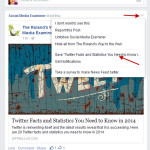
Have you ever seen a link a friend has shared and tried to find it several days or weeks later? It can be such a pain, especially if you can’t remember who posted it. Facebook has a save feature that lets you save links, places, music, books, movies tv shows and event posts. The save… [Read More]
Why small business owners can’t afford to ignore Social Media any longer

Many small business owners perceive social media as simply a marketing option; just another marketing tool, like PPC or list building that they may choose to use or not use when promoting their business. Unfortunately, this is no longer true. Small business owners simply cannot afford to ignore social media any longer. Changes to search… [Read More]
Pinterest Introduces Web Analytics
Pinterest can be a great venue for marketing your business, but like all other marketing efforts it is important to know if your hard work is paying off. Does anyone even care about pins from your website? How many people have seen your pins? Is your website generating any traffic from Pinterest? If you are… [Read More]
Avoiding Social Media Mania
Are you overwhelmed by social media marketing? Do you know what social media platforms will best reach your customers? How often do you need to make posts? Where do I come up with new content ideas? If social media is starting to feel like social mania, here are some tips that will help you develop… [Read More]
What Happened to my LinkedIn Applications?!
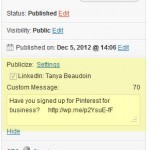
This week LinkedIn updated my profile page to their new format. They have been rolling out the update for several weeks now, so if your profile hasn’t been updated already, you can expect it to be updated soon. The changes to the profile page give a crisp, clean overview of your professional story. The main… [Read More]
Have you signed up for Pinterest for business?

Recently Pinterest introduced new accounts and tools specifically for businesses. Now there are personal accounts for individuals and business accounts for businesses or organizations. Prior to the introduction of business accounts, commercial usage was actually prohibited on Pinterest. The new terms of service for business accounts allows commercial usage for business accounts only. Aside from… [Read More]
FREE Social Media Plugins for WordPress

Promoting your WordPress blog is essential to building readership and increasing search engine rankings. I have pulled together some of my favorite WordPress plugins that make managing your social media marketing efforts a little easier. I have identified four main areas of social media marketing that you need to focus on: Automating your social media… [Read More]
How to Schedule Facebook Posts
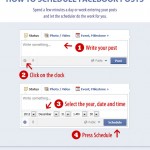
Keeping on top of your Facebook page can seem time consuming and overwhelming, but it doesn’t need to be. You may have found that too many posts at one time (that clutter up a feed) can be annoying and may get your page “unliked”, but you don’t have the time or the will sit on… [Read More]
Commenting Etiquette – How to Successfully Comment on Other Blogs.

Networking and online conversation are becoming critical elements of your online marketing strategy. Most people think of social media discussion when they think of online networking, but successful networking strategy also includes blog commenting. Blog commenting is an excellent way to position yourself as an expert and to build your brand online. As is the… [Read More]
How to Find Out Who Likes Your Facebook Page
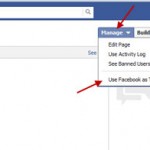
Facebook is a like a living organism constantly changing and adapting. The company philosophy on change is evident in one of their internal slogans, “Move Fast and Break Things.” Nothing stands in the way of progress… but what does that mean for users like us? It means we have to constantly relearn how to do… [Read More]


